Description
In this reference design, each port of the Ethernet FMC (or Robust Ethernet FMC) is connected to its own AXI Ethernet Subsystem IP, which is connected to the system memory through its own AXI DMA IP. The four ports are completely independent of each other: each one has its own MAC, its own DMA, its own MDIO bus and its own PHY.
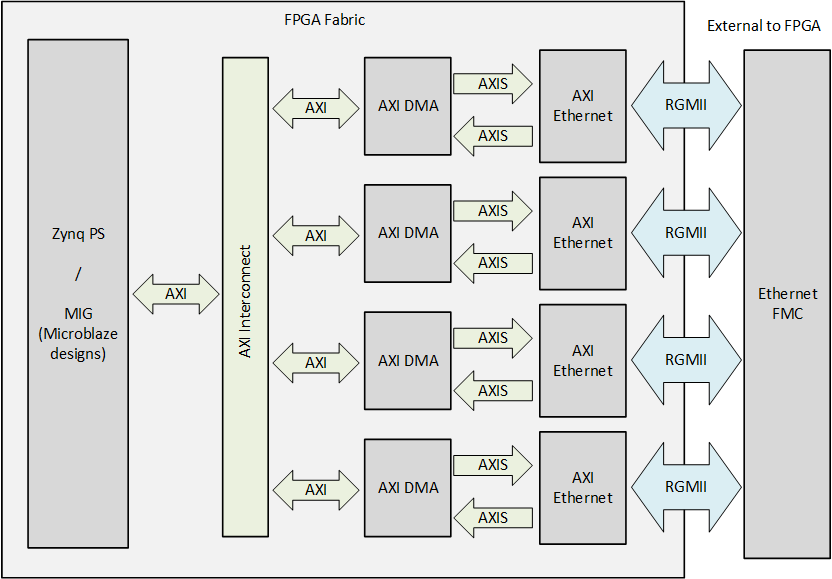
How the design works
For each port of the Ethernet FMC:
PHY (on the FMC). A Marvell gigabit Ethernet PHY drives the RJ45 connector. It connects to the FPGA over the FMC connector with an RGMII data interface, an MDIO management interface and a reset line. Every PHY sits on its own MDIO bus at MDIO address 0.
AXI Ethernet Subsystem. A tri-mode (10/100/1000 Mbit/s) Ethernet MAC with an RGMII interface and an MDIO master. The MACs are configured with full TX and RX checksum offload: the hardware computes and checks the IP/TCP/UDP checksums. On the RGMII interface the FPGA shifts the transmit clock by 90 degrees (
gtx_clk90), and the PHY adds the delay to the receive clock (Linuxphy-modergmii-rxid).AXI DMA. A scatter-gather DMA moves the frames between the MAC’s AXI-Stream interfaces and memory: MM2S (memory to stream) for transmit, S2MM (stream to memory) for receive. Its three AXI master interfaces (scatter-gather, MM2S, S2MM) reach the DDR through an AXI SmartConnect and the processor’s high-performance slave port (Zynq HP0) or the memory controller (MicroBlaze designs).
Control. The processor accesses the registers of every MAC and DMA through an AXI-Lite interconnect. Each port contributes four interrupts (two from the MAC, two from the DMA).
Shared by all ports:
Clocking. The Ethernet FMC carries a 125 MHz oscillator. The design enables it and feeds it to a clock wizard, which generates the 125 MHz RGMII transmit clock and the reference clock for the IDELAY controller (200 MHz on 7-series devices, 333.333 MHz on UltraScale and UltraScale+ devices). One port is configured with shared logic: it contains the clock buffers and IDELAY controller and forwards the transmit clocks (
gtx_clk,gtx_clk90) to the other ports.Board Ethernet port. On the Zynq-7000 and Zynq UltraScale+ boards the carrier’s own Ethernet port (PS GEM0 on Zynq-7000, PS GEM3 on Zynq UltraScale+) is enabled and described in the Linux device tree. It is not part of the FMC test, but it gives you a network connection to the board (for example SSH) that is independent of the ports under test.
Processor families
The repository supports three families of carrier. The port chains are the same in all of them; the processor side differs:
Family |
Boards |
Processor |
Software |
|---|---|---|---|
Zynq UltraScale+ |
ZCU102, UltraZed-EV |
Zynq UltraScale+ PS (Cortex-A53) |
Standalone echo server, PetaLinux, Yocto |
Zynq-7000 |
ZC702, ZC706, ZedBoard, PicoZed |
Zynq-7000 PS (Cortex-A9) |
Standalone echo server, PetaLinux, Yocto |
FPGA (MicroBlaze) |
AC701, KC705, VC707, VC709, KCU105, VCU108, VCU118 |
MicroBlaze soft processor with a MIG (DDR3 / DDR4) memory controller, AXI UART16550, AXI Timer and AXI interrupt controller |
Standalone echo server |
The 8-port zc702_lpc2_lpc1 design is a special case: the ZC702’s device does not have enough
resources for 8 MACs with DMAs, so its MACs use AXI FIFOs instead of DMAs and have no checksum
offload. See Supported carriers.
Block design
The diagram below shows the Vivado block design axieth as the scripts in Vivado/src/bd/ build
it, with the real cell names, the address map and the clock frequencies of the built designs. One
port chain is drawn; the other ports are identical copies.
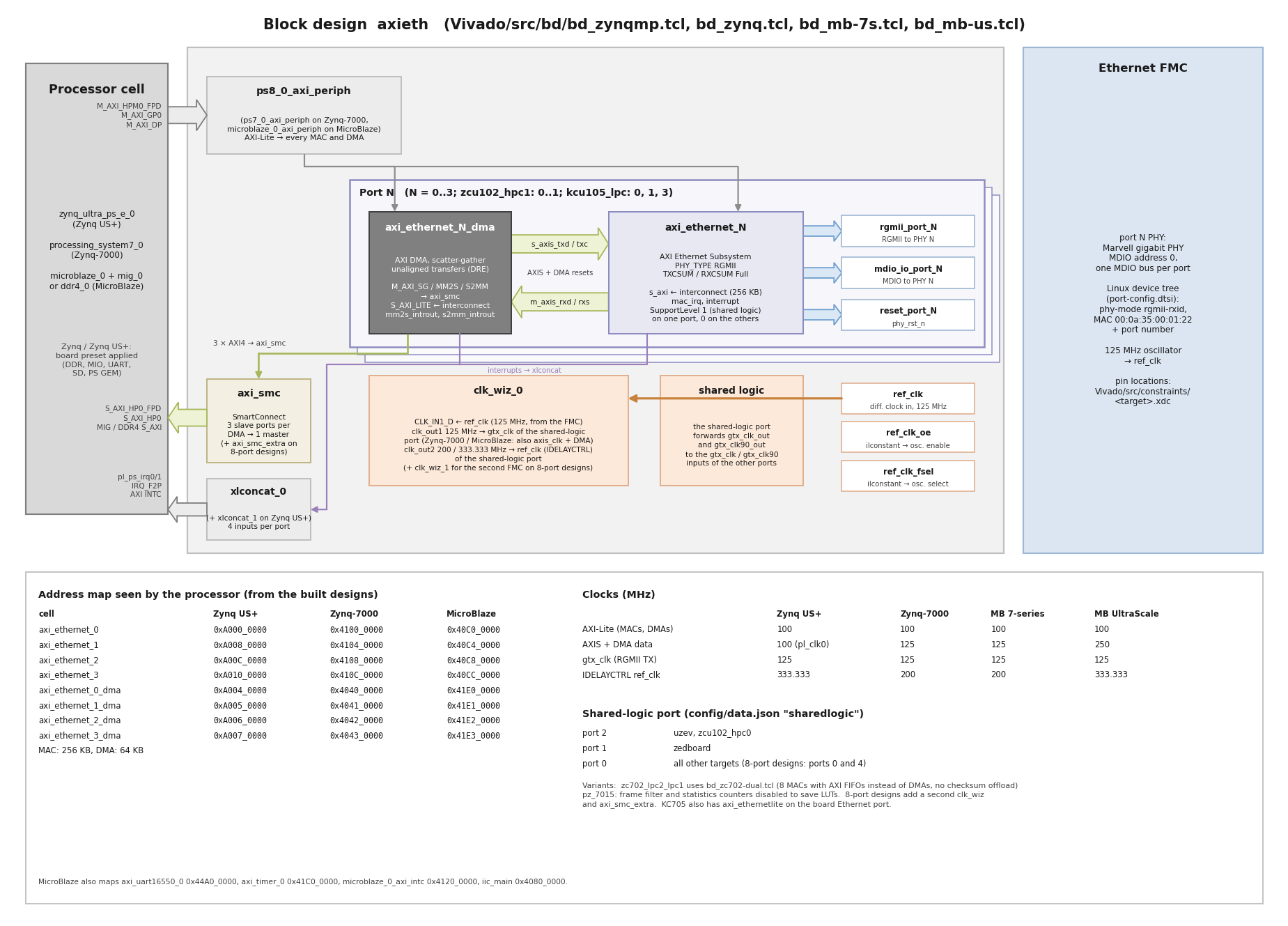
The diagrams are generated by the scripts docs/source/images/gen_block_diagram.py and
docs/source/images/gen_bd_diagram.py (Python 3 with matplotlib).
MAC addresses used by Linux
The PetaLinux and Yocto images give the Ethernet FMC ports fixed MAC addresses (set in the
port-config.dtsi device-tree fragment of each BSP):
Ethernet FMC port |
MAC address |
|---|---|
Port 0 |
|
Port 1 |
|
Port 2 |
|
Port 3 |
|
Note
These addresses are the same on every board that runs these images. If you connect more than one
board to the same network, change the local-mac-address properties in
PetaLinux/bsp/ports-*/…/port-config.dtsi and Yocto/bsp/port-configs/ports-*/…/port-config.dtsi
so that every board has unique addresses. The same applies to the fixed MAC address that the
ZedBoard and ZCU102 BSPs give the board Ethernet port (local-mac-address in the board’s
system-user.dtsi).
Hardware Platforms
The hardware designs provided in this reference are based on Vivado and support a range of FPGA and MPSoC evaluation boards. The repository contains all necessary scripts and code to build these designs for the supported platforms listed below:
FPGA platforms
Target board |
FMC Slot Used |
Supported |
Standalone |
PetaLinux |
Yocto |
|---|---|---|---|---|---|
HPC |
4x |
✅ |
❌ |
❌ |
|
HPC |
4x |
✅ |
❌ |
❌ |
|
LPC |
4x |
✅ |
❌ |
❌ |
|
LPC & HPC |
8x |
✅ |
❌ |
❌ |
|
HPC1 |
4x |
✅ |
❌ |
❌ |
|
HPC2 |
4x |
✅ |
❌ |
❌ |
|
HPC2 & HPC1 |
8x |
✅ |
❌ |
❌ |
|
HPC |
4x |
✅ |
❌ |
❌ |
|
HPC |
4x |
✅ |
❌ |
❌ |
|
LPC |
3x |
✅ |
❌ |
❌ |
|
LPC & HPC |
7x |
✅ |
❌ |
❌ |
|
HPC0 |
4x |
✅ |
❌ |
❌ |
|
HPC1 |
4x |
✅ |
❌ |
❌ |
|
FMCP |
4x |
✅ |
❌ |
❌ |
Zynq-7000 platforms
Target board |
FMC Slot Used |
Supported |
Standalone |
PetaLinux |
Yocto |
|---|---|---|---|---|---|
LPC |
4x |
✅ |
✅ |
✅ |
|
LPC |
4x |
✅ |
✅ |
✅ |
|
LPC |
4x |
✅ |
✅ |
✅ |
|
LPC1 |
4x |
✅ |
✅ |
✅ |
|
LPC2 |
4x |
✅ |
✅ |
✅ |
|
LPC2 & LPC1 |
8x |
✅ |
❌ |
❌ |
|
LPC |
4x |
✅ |
✅ |
✅ |
|
LPC |
4x |
✅ |
✅ |
✅ |
Zynq UltraScale+ platforms
Target board |
FMC Slot Used |
Supported |
Standalone |
PetaLinux |
Yocto |
|---|---|---|---|---|---|
HPC |
4x |
✅ |
✅ |
✅ |
|
HPC0 |
4x |
✅ |
✅ |
✅ |
|
HPC1 |
2x |
✅ |
✅ |
✅ |
Software
These reference designs can be driven by a standalone application or from embedded Linux, built with either PetaLinux or the AMD Yocto / Embedded Development Framework (EDF) flow. The repository includes all necessary scripts and code to build each of them. The table below outlines the applications available in each environment:
Environment |
Build flow |
Available Applications |
|---|---|---|
Standalone |
Vitis |
lwIP Echo Server (see Stand-alone lwIP Echo Server) |
Linux |
PetaLinux (see PetaLinux) |
Built-in Linux commands |
Linux |
Yocto / EDF (see Yocto) |
Built-in Linux commands |
The PetaLinux flow is being retired: 2025.2 is the last tool version for which this repository supports it. From the next tool version onward, Linux images are built with the Yocto / EDF flow only.